

Contributed by Jess Wang on 2026-06-01
Your existing evals tell you how well your AI performs on things you already know to test for, but what about the patterns and failure modes that you’re not aware of yet?
In this cookbook, we’ll build a customer support chatbot that generates hundreds of conversation logs between human and AI, and use Topics to surface patterns in the system that we wouldn’t have caught with traditional evaluations.
By the end, you’ll learn how to:
- Use Topics to classify conversations by task, sentiment, and issues
- Dig into failure clusters to identify specific prompt and system-level bugs
- Build targeted eval datasets from Topics classifications
- Iterate on prompts and measure improvement with offline evals
Getting started
We’re building a customer support chatbot for a fictional e-commerce company called Evergreen Goods. The chatbot uses OpenAI’s API to interact with Supabase to look up orders, process refunds, initiate returns, and check shipping status. You’ll need:- A Braintrust account with an API key
- An OpenAI API key
- A Supabase project with Edge Functions enabled
- Python 3.12+ with the
braintrust,openai, andrequestspackages
Setup and code explanation
The Supabase database has six tables:- customers: customer profiles with loyalty tiers (Bronze, Silver, Gold) and point balances
- products: 15 outdoor/lifestyle products with SKUs, prices, sizes, and colors
- orders: orders with statuses (shipped, delivered, cancelled, etc.), tracking numbers, and payment info
- returns: return records linked to orders
- refund_requests: refund records with processor responses
- support_tickets: escalation tickets created by the bot
supabase_tools.py and the chatbot itself is in chat_app.py.
And this is our initial system prompt:
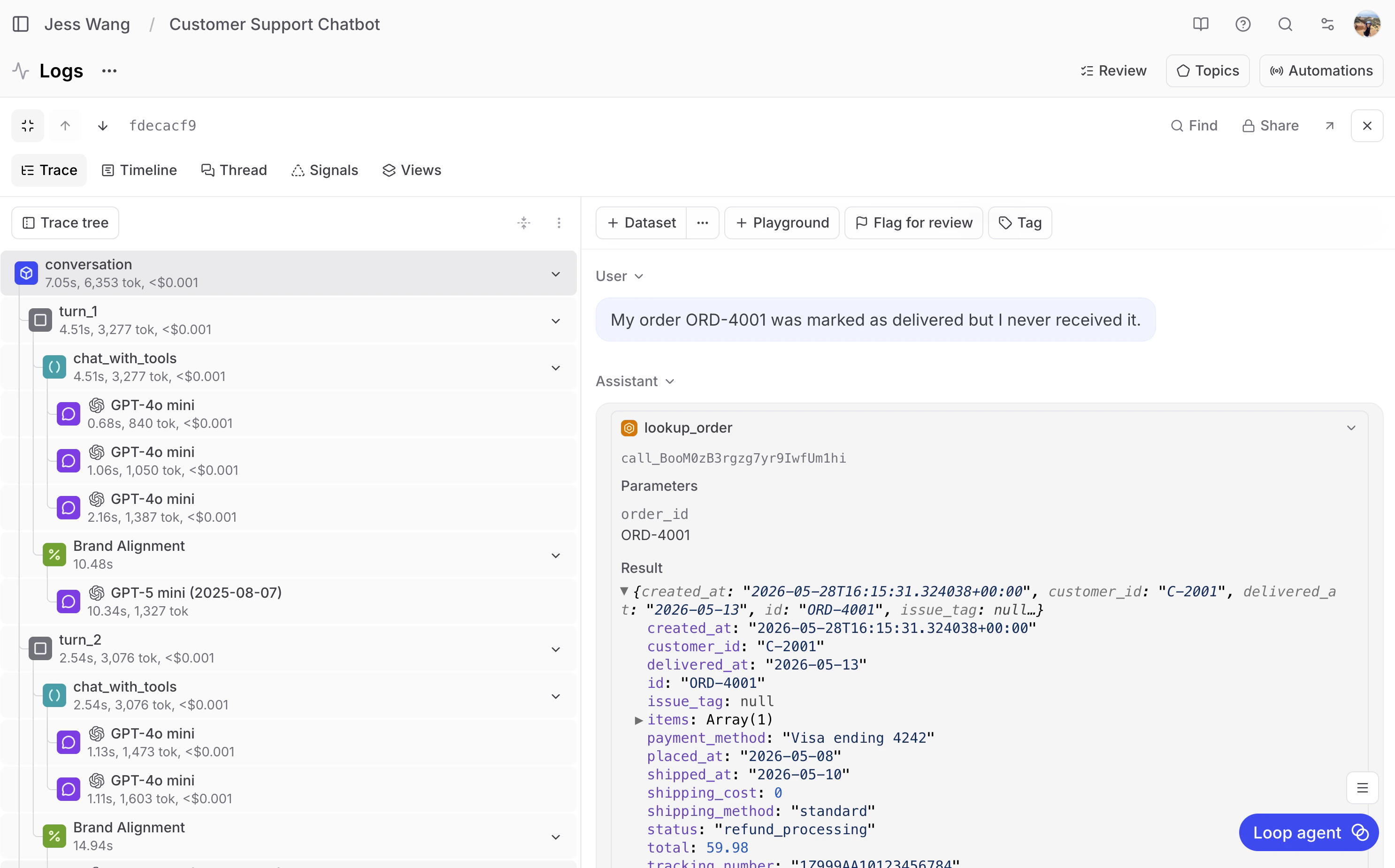
Generating conversation logs
The log generator runs 51 scripted scenarios across six categories, with optional generated follow-up turns:generate_logs.py.
Using Topics to find failures
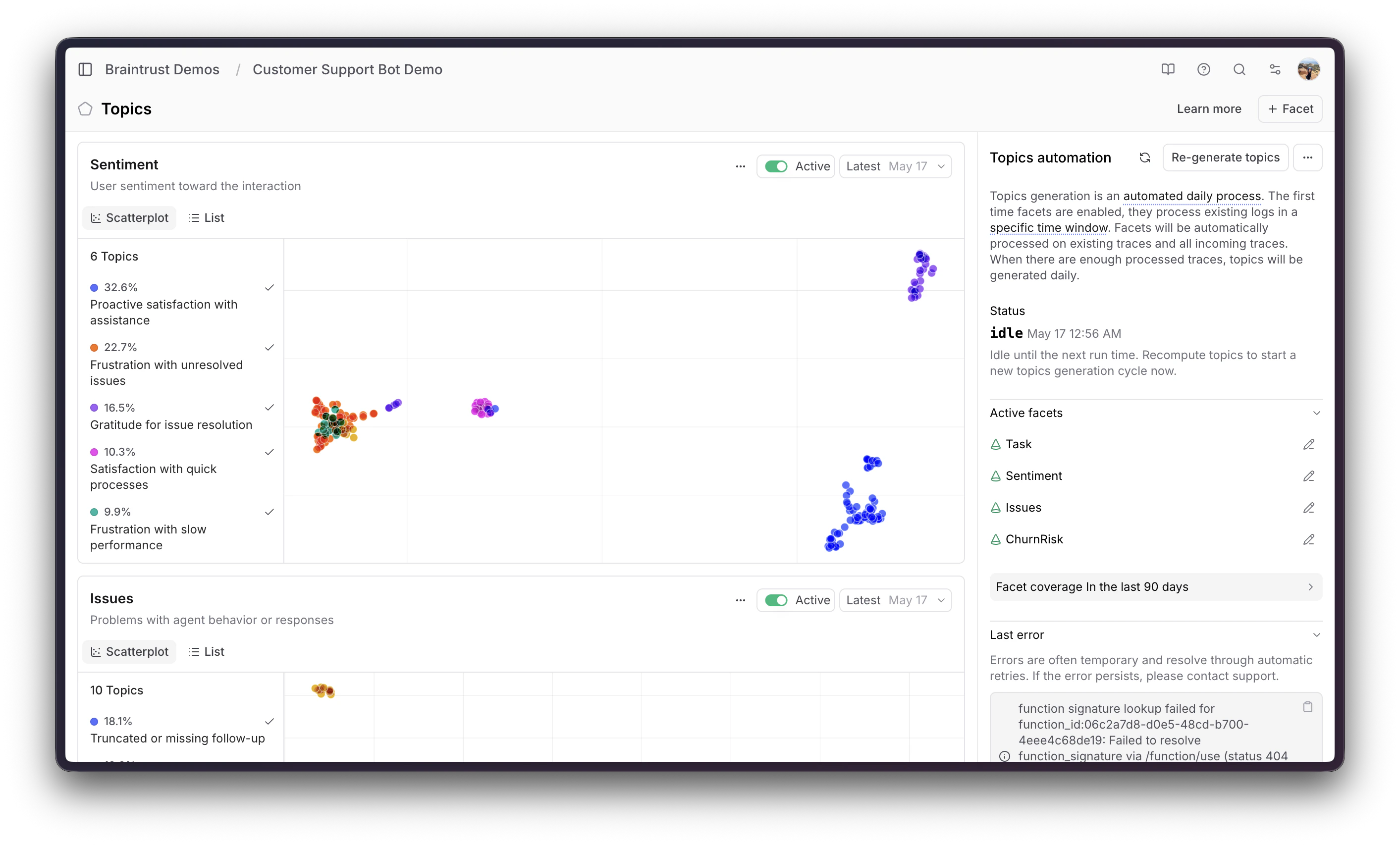
Once the logs are in Braintrust, go to Topics. Topics automatically classifies each conversation across three built-in facets:- Task: What was the customer trying to do? In this project, Topics identified clusters like “Product sizing and returns” for customers dealing with fit issues and return requests, “Shipping status inquiries” for customers tracking delayed packages, and “Billing disputes” for promo code and double-charge complaints.
- Sentiment: How did the customer feel about the interaction? Topics classified conversations into clusters like “Positive resolution” where the customer’s issue was handled well, “Negative emotional distress” where the customer left frustrated, and “Neutral informational” for straightforward product questions.
- Issues: Did something go wrong during the conversation? This facet surfaced clusters like “Payment processing failures” where the refund tool returned errors, and “Order lookup errors” where the bot couldn’t find an order number in the system.
Digging into the failure cluster
Filtering to Sentiment: Negative emotional distress showed that a majority (32%) of negative conversations were classified under the “Product sizing and returns” task cluster. This is where customers were most frustrated. At this point, I would recommend spending a good 20-30 minutes manually reading through the logs. Though you could technically use AI to automate this portion of it, it’s better to have a human read through and decide which AI responses were fine (even if it evoked negative emotion) versus which ones fundamentally need to be fixed. As I did this myself, I wrote down what needed to be fixed in my system. 1. Order not found = dead end. When a customer referenced an order number that wasn’t in the system, the bot just said “order not found” and stopped. I think the correct behavior should be to look up the customer’s account to find valid order numbers, or find other order numbers that are close to what the customer provided, in case they made a typo. 2. Shipping delays = no refund. When a customer paid for express shipping and it took 8 days (well past the 2-3 day window), the bot refused to refund shipping because the order status was “shipped.” I think the correct behavior here would be to allow for a full refund on shipping only. 3. Return + refund race condition. When processing a return and refund together, the bot would process the refund first, then tell the customer they couldn’t return the item because “a refund is in progress.” 4. Promo code delays. When a customer reported a missing promo discount, the bot correlated the return status of the product with discount eligibility. However, promo discounts are applied at checkout, so delivery status is irrelevant. 5. 5xx errors = immediate escalation. When a tool call hit a transient server error, the bot immediately escalated to a human instead of having any sort of retry logic setup.Building a targeted eval dataset
From the Topics UI, we saved the conversations in the “Product sizing and returns” cluster to a dataset called Product Sizing and Return Issues. This gives us a focused eval set containing exactly the conversations where the bot was failing. We cleaned the dataset to contain just the customer messages and the turn count so that we could replay it faithfully. Before cleaning:Running offline evals
The eval script runs each customer complaint through the chatbot with real Supabase tools, then scores the response with three LLM-based scorers. The eval scorers are custom functions we wrote to measure specific dimensions:- Helpfulness checks whether the agent addressed the customer’s concern and provided clear next steps.
- Resolution checks whether the agent actually took action (processed a refund, initiated a return, or provided tracking) rather than just acknowledging the problem without doing anything.
- Empathy checks whether the agent’s tone was professional and acknowledged the customer’s frustration.
eval_product_sizing_returns.py.
The v1 baseline scores on the Product Sizing and Return Issues dataset:
Fixing the prompt
Based on the five failure patterns from Topics that I outlined above, we updated the system prompt:process-refund edge function was updated to allow refunds on shipped orders (not just delivered). The original edge function had a status check that only permitted refunds when order.status was delivered or return_in_progress, so even when the prompt told the bot to process a shipping refund, the API rejected it with an INVALID_ORDER_STATUS error. Adding shipped to the allowed statuses unblocked the prompt fix.
Measuring improvement
Running the same eval dataset with the updated prompt:
Helpfulness nearly doubled. The bot is now actually processing refunds for delayed shipments, handling promo codes as billing corrections, and retrying on transient errors instead of immediately escalating.
Deploying and monitoring
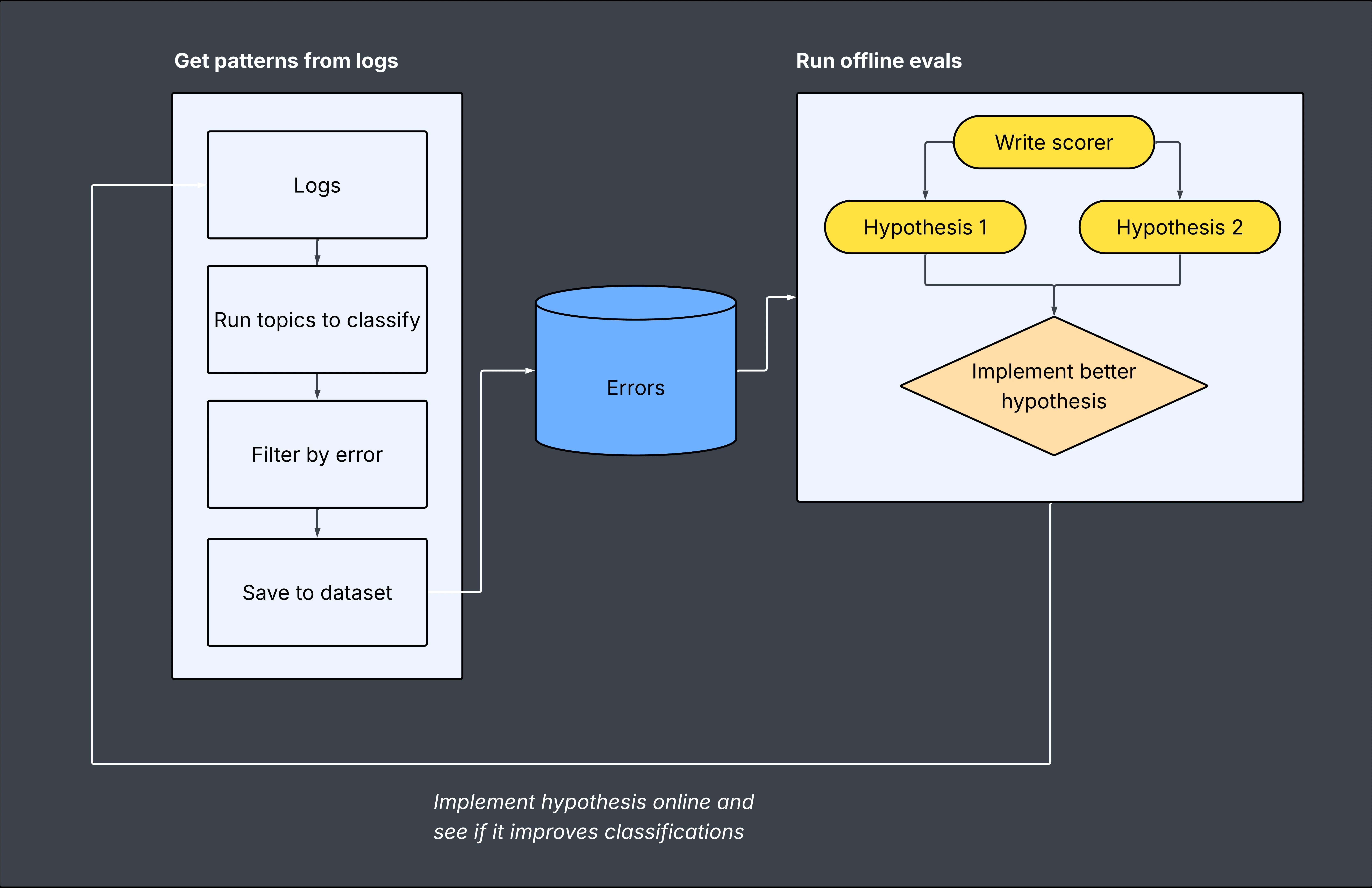
After validating the v2 prompt with offline evals, we updated the production system prompt and generated a fresh batch of ~200 logs. Topics reclassified the new conversations, and the failure patterns from the original clusters were significantly reduced. This is the core loop that Topics enables:- Log production conversations with tracing
- Classify automatically with Topics (task, sentiment, issues)
- Identify failure clusters you didn’t know existed
- Save the failing conversations to a dataset
- Eval prompt changes against that dataset
- Deploy and verify with fresh production logs
Next steps
- Add custom facets to classify dimensions specific to your domain (for example, “Resolution Gap,” which checks whether the bot sounded helpful but failed to actually resolve the issue)
- Set up online scoring to get real-time quality signals alongside Topics classifications
- Explore the Braintrust SDK to programmatically query Topics data and build automated alerting